
Download Phone Caller ID for PC – Caller Display, Call Logging, Contact Management
Overview
Phone Caller ID for PC is a practical software solution designed to bridge the gap between traditional telephony and modern computing environments. Primarily intended for small to medium-sized businesses and home users, the application enhances communication efficiency by displaying caller information directly on a computer screen. By connecting the PC to a telephone line, the software captures Caller ID signals transmitted between the first and second rings, enabling real-time identification of incoming calls. This functionality helps users avoid missed calls, reduce call handling time, and improve customer service responsiveness.
The software serves as a digital extension of the telephone system, offering automated logging of incoming calls with timestamps, dates, and caller numbers. This feature supports follow-up actions, record-keeping, and internal communication tracking. For users managing multiple lines or frequent client interactions, the ability to instantly recognize callers—especially those in a contact database—provides a significant advantage. While the developer did not provide additional background information, the app’s long-standing presence since its release on June 14, 2011, suggests a stable and tested utility for users seeking reliable telephony integration.
Real-world use cases include receptionists managing multiple calls, remote workers monitoring business lines, and home users tracking personal or family communications. In an era where mobile apps dominate, Phone Caller ID for PC fills a niche for users who rely on landline systems and want enhanced visibility without switching hardware. Its role in the broader software ecosystem lies in its ability to modernize legacy telephony infrastructure with minimal setup and no need for complex VoIP configurations.
Key Features & Functionality
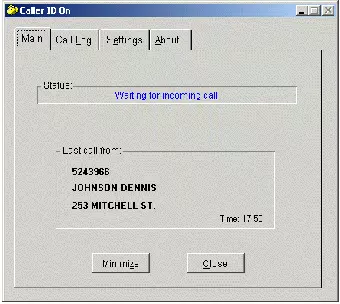
- Real-Time Caller Display: When a call comes in, the software triggers an immediate screen pop-up showing the caller’s number. If the number exists in the contact database, the associated name and additional details are displayed, reducing the need for manual lookup.
- Integrated Call Log Management: All incoming calls are automatically recorded with date, time, and caller number. This log serves as a searchable history, ideal for follow-ups, billing, or compliance purposes.
- Easy Contact Importing: Users can import contact data from other software applications, streamlining the setup process and eliminating the need for manual entry.
- Caller ID Signal Compatibility: The software leverages standard Caller ID signals sent by telecom providers, ensuring accurate data capture during the brief window between the first and second ring.
- User-Friendly Interface: Designed with accessibility in mind, the interface allows users of varying technical skill levels to navigate settings, view logs, and manage contacts without training or technical support.
For example, a small business owner can use the software to instantly identify a returning client, pull up their history from the call log, and respond with personalized service. A home user might use it to track calls from utility providers or family members, ensuring no important communication is overlooked. The integration of real-time notifications and automated logging transforms a basic landline into a smart communication tool, enhancing both personal and professional productivity.
Interface, UX & Performance
The user interface of Phone Caller ID for PC is designed with simplicity and clarity in mind. The layout emphasizes essential functions—caller display, call log access, and contact management—ensuring that users can perform tasks with minimal navigation. Visual elements are straightforward, with pop-up notifications clearly highlighting incoming caller information, including number and name if available.
Navigational flow is linear and intuitive. Users can access the call log with a single click, view contact import options from the main menu, and adjust settings without encountering complex submenus. The application does not appear to require advanced configuration, making it suitable for users without technical expertise.
Although the developer did not list formal performance metrics, the software’s functionality suggests stable operation on standard desktop systems. It is designed to run in the background without consuming excessive system resources, allowing users to continue working on other tasks while maintaining call visibility. Responsiveness is expected to be prompt, given the real-time nature of caller display, and stability appears consistent based on its long-standing availability since 2011. However, specific compatibility with modern operating systems or hardware configurations was not disclosed.
Platform Compatibility & Technical Requirements
Phone Caller ID for PC is designed for desktop environments and operates on Windows-based systems. The application requires a computer connected to a telephone line with Caller ID support from the service provider. The software utilizes the standard Caller ID signal transmitted during the initial rings of an incoming call.
The file size and specific version details were not provided. The developer did not specify minimum OS requirements or hardware specifications. Compatibility with current Windows versions (such as Windows 10 or 11) is not confirmed. Similarly, no information was given about whether the software supports 64-bit systems or specific USB-to-telephone adapters.
Users should ensure their phone line and service provider support Caller ID functionality, as the software depends on this signal for operation. Without proper signal transmission, the core features may not function as intended. The developer did not list additional technical prerequisites or dependencies.
Pros and Cons
Pros
- Real-time caller display with pop-up notifications
- Automatic call log recording with date, time, and number
- Supports contact import from other software
- Compatible with standard Caller ID signals from telecom providers
- Simple, intuitive interface suitable for non-technical users
Cons
- Developer did not provide version or file size details
- Specific OS compatibility requirements were not listed
- No information on support for modern Windows versions
- Dependent on external Caller ID signal availability
- Platform is desktop-only; no mobile or cloud integration
FAQ
Is Phone Caller ID for PC compatible with modern Windows systems?
The developer did not specify compatibility with current Windows versions. Users should verify functionality on their system before installation.
Can I use this software with a VoIP phone line?
Compatibility with VoIP services depends on whether the provider transmits standard Caller ID signals. The software may not function properly if the signal is not delivered in the required format.
Does Phone Caller ID for PC require a special hardware adapter?
The software requires a telephone line connection, but specific hardware requirements were not disclosed. Users may need a compatible modem or adapter depending on their system setup.
How do I import contacts into the software?
The software supports importing contact data from other applications. Users can typically import from CSV or other common formats, though exact methods were not detailed.
Is the software secure and safe to install?
While no security vulnerabilities were reported, users should download the software from official sources and ensure their system has up-to-date antivirus protection.
Final Thoughts
Phone Caller ID for PC remains a functional and reliable tool for users who depend on landline systems and seek enhanced call visibility. Its ability to deliver real-time caller information, maintain detailed logs, and support contact imports makes it a valuable asset for small businesses and home users alike. Despite the lack of updated technical specifications, its core features continue to serve a clear need in the digital workspace.
For individuals managing frequent calls, especially in professional settings, the software offers a straightforward way to improve communication efficiency without switching to complex VoIP systems. Its user-friendly design ensures quick adoption, while its long-standing presence indicates consistent performance.
Download Phone Caller ID for PC now


